
For a while, my smart home lived on a Raspberry Pi. It worked, until I started wanting more: ad blocking for the whole house, a budgeting app that does not hand my bank logins to a startup, and a way to know when something at home had quietly fallen over.
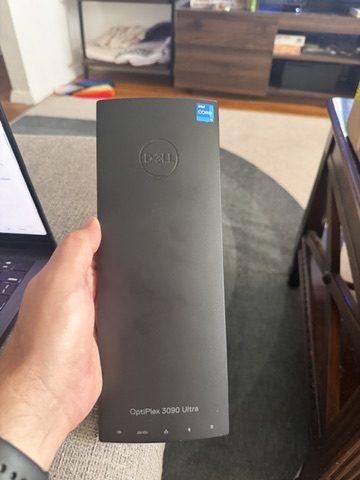
So I bought a used Dell OptiPlex 3090 Ultra on eBay for $189.99, and over five weeks it became the machine that runs nearly everything in the apartment. This is what is on it, what it cost, and the three things that broke before any of it worked.
The rules I set first
I wanted it to be cheap, private and boring. No new subscriptions, nothing exposed to the internet, and nothing I would need to babysit every weekend. I was new to Proxmox and Docker, but I am happy to follow a detailed set of command line steps if someone explains why each one is there.
The hardware
The OptiPlex has an i5-1145G7 with four cores and eight threads, 16 GB of RAM and a 256 GB NVMe drive. I also use a 500 GB USB SSD I already owned as the nightly backup target, and my old Pi 5 got a second job as a standby.
At idle, with everything running, the CPU package draws about 3 watts according to Intel’s own energy counter. That is the chip only, not the whole box measured at the wall. Load average sits around 0.1, so the machine is mostly asleep.
What runs on it
Proxmox is the base. On top of it, Home Assistant gets its own VM so it keeps its add-on store, and a second Debian VM runs everything else in Docker.
- Home Assistant, with the voice add-ons.
- Three Pi-hole ad blockers: a main one in Docker, a small backup in a container, and a third on the Pi 5 so DNS survives if the OptiPlex is ever off.
- Tailscale, so I can reach everything from my phone with no open ports.
- Caddy, which gives each service a friendly name and HTTPS.
- Actual Budget, twice, one for me and one for my partner, completely isolated from each other.
- Uptime Kuma, which watches 23 things and pushes to my phone when one stops responding.
- Music Assistant, a dashboard called Homepage, and a self-hosted wiki I call the Home Bible.
The memory story is the part I like most. Every Docker service has a hard cap, so a runaway container cannot take the others with it. Music Assistant uses about 229 MB of a 1.5 GB cap, Pi-hole uses 27 MB, and Proxmox still reports around 5 GB free.
What went wrong first
The migration looked broken and was not
I restored a Home Assistant backup onto the new VM, and the browser kept showing “can’t connect, reconnecting.” After a few minutes of panic I found the cause. My old Pi had Home Assistant listening on port 80 instead of the usual 8123, and the restore carried that setting over. Dropping the port from the URL fixed it. The whole move took about a day, and I left the old Pi powered down with its SD card untouched as a cold fallback.
The voice add-ons crash-looped
Speech-to-text, text-to-speech and the wake word all kept restarting with an error about NumPy and X86_V2. The VM setup script had a CPU model prompt that I left on its default, which is a generic virtual CPU that hides modern instructions. Changing the CPU type to host and rebooting fixed everything at once. If you run a single Proxmox node, pass the real CPU through.
IPv6 was the villain of the whole build
My network is IPv4 only, but the router still advertised IPv6 just enough to confuse things. Docker image downloads failed, the Pi-hole installer could not reach GitHub, and Actual Budget printed “Listening” and then quietly exited in a restart loop because it was binding to an address that did not exist.
The setting most guides suggest for turning off IPv6 did not stick, because the network manager turned it back on at every boot. Only a kernel boot flag worked. After that, every new service got an explicit instruction to listen on IPv4.
What I would do the same way
Every risky change got a backup first, a written rollback plan, and a check afterward. Backups come in three layers: a nightly snapshot of every VM to the external SSD, an encrypted off-site copy on Backblaze B2 that stays inside the free tier, and every config file in git. Each job reports to Uptime Kuma, so if a backup does not check in, my phone buzzes. I have tested a restore, not just assumed one would work.
I also typed every password, token and API key myself into files only root can read. None of them went through an AI assistant.
The bill
The OptiPlex cost $189.99. The Pi 5 and the external SSD were already sitting in my drawer, so they cost nothing new. The software is all free, Tailscale is on the personal plan, and Backblaze sits inside its free tier at roughly 55 MB of 10 GB. Ongoing cost: $0 a month.
Where this goes next
Fiber is coming this month, probably with a new router, and I already have a checklist for carrying the whole setup over. I also want to learn to build my own ESP32 temperature and humidity sensors instead of buying more gadgets.
The best part of this project was a different post, though. About three weeks in, I took down my own house’s internet. That story, and the careful way I rebuilt the network afterward, is up next.